ServerLife - Tip Tracker
- 4.8
- Rating
- 100.00K
- Installs
- Free
- Price

 Analysis by App-foxy
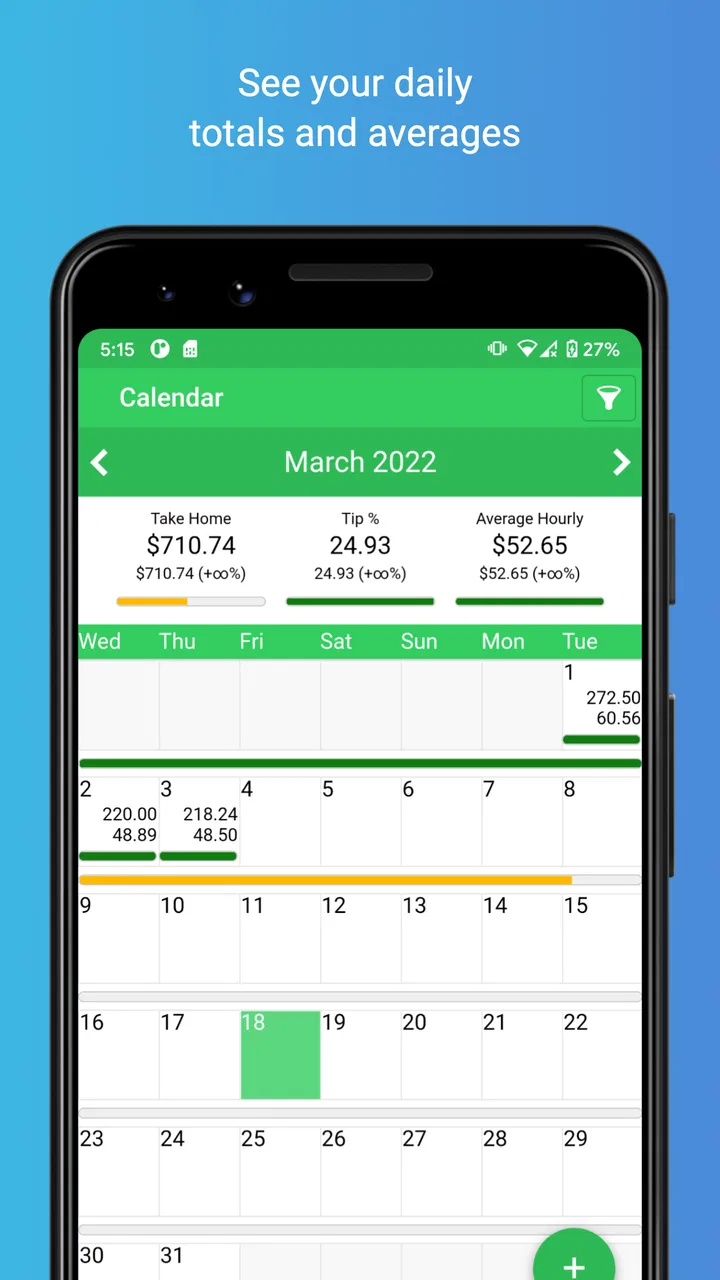
I found ServerLife - Tip Tracker most useful when I stopped treating it as a simple tip calculator and started using it as a small work journal. It is a finance app from MZBApps LLC for servers, drivers, and other workers whose income changes from shift to shift. I can record what I earn, separate different kinds of income, and look back at my work instead of trying to reconstruct everything from memory, receipts, or scattered notes.
That focus makes it more practical than a general budgeting app for people who receive tips regularly. A traditional budget tool is usually built around fixed paychecks, monthly bills, and bank transactions. ServerLife is aimed at the messy part before that: the individual shift, the cash in hand, and the changing total that needs to be tracked while work is still fresh. My overall impression is positive, especially for someone who wants a straightforward record without turning every shift into an accounting project.
How the layout feels during a busy workday
The most important test for an app like this is not how impressive it looks while sitting at home. It is whether I can understand it when I am tired, distracted, or trying to enter information quickly after a shift. ServerLife works best in that short window when I remember the details but do not want to spend several minutes navigating through a complicated finance system.
You May Also Like

 Blood Strike: 2.5 Anniversary
Blood Strike’s Loadouts Turn Every Drop Into a Tactical Gamble
A close look at Blood Strike’s custom loadouts: how fast access to signature weapons reshapes its battle royale rhythm, rewards preparation, and narrows the gap between fights.

 Pandora - Music & Podcasts
Pandora’s Music Is Easy to Start, but Harder to Recover
Pandora’s strength is its low-effort path from a seed to a station. Its weak spot is how much confidence it asks you to place in connection, setup, and quiet recovery.

 8 Ball Pool
 Is Built on Rivalries, Rematches, and Routine
A close look at the rivalries, rematches, shared routines, and unanswered safety questions that turn a quick pool match into a persistent mobile community.

 Samsung Music
’s Quiet Strength Is Playing What You Already Own
Its reach comes less from spectacle than from dependable access to a personal library. That simplicity is both the app’s strongest retention engine and its ceiling.

 AccuWeather: Weather Radar
AccuWeather Review: A Quick, Clear Forecast for Everyday Decisions
For everyday plans, the best forecast is the one you can understand quickly. AccuWeather makes rain timing, radar, and local conditions easy to act on, with a few trade-offs.

 Hill Climb Racing
Why Hill Climb Racing Still Turns Crashes Into One More Run
A tiny car, a bumpy hill and one more upgrade: Hill Climb Racing keeps resurfacing because its simple chaos makes every near-miss feel personal.
More From Our News Desk



The app’s purpose is easy to understand from the start. It is not trying to be a full banking platform, investment dashboard, or tax service. That narrower purpose helps the navigation feel less intimidating for someone who is uncomfortable with financial software. I can approach it as a record of work rather than as a demanding money-management system.
For readability, the strongest advantage is the limited scope. A person who finds dense financial dashboards tiring may prefer seeing work-related entries instead of balances, categories, charts, and account connections competing for attention. I also appreciate that the app’s central idea can be explained in everyday language: enter what happened during work, then use those entries to understand income over time.
That does not mean every user will find it effortless. Tip tracking depends on consistent habits, and the value of the history depends on entering information with enough detail to recognize it later. If I rush through an entry, I may remember the amount but forget the shift, workplace, or context it belonged to. The app can organize what I provide, but it cannot repair an incomplete routine.
A useful approach is to decide on a personal entry pattern before using it seriously. For example, I might always record the date, workplace or route, hours, tips, and other income in the same order. This is a small change, but it reduces the mental effort of deciding what to enter each time. It also makes later comparisons more meaningful because similar shifts are described consistently.
People who prefer large text, strong contrast, or screen magnification should judge the app on their own device rather than assuming that a finance app will suit every visual need. I can say that the focused design is less overwhelming than a broad personal-finance platform, but individual comfort depends on phone settings, display size, and eyesight. Enlarging system text or using the phone’s built-in display tools may help, although those adjustments can sometimes make a compact interface feel less balanced.
Navigation that favors short entries over financial analysis
ServerLife makes more sense as a quick logging tool than as a place for long sessions of analysis. That distinction matters for users with attention difficulties, fatigue, or limited time between responsibilities. I would rather enter a shift immediately and review patterns later than postpone the task until several days of details have blended together.
One non-obvious benefit of this workflow is that it can reduce memory pressure. Instead of asking myself to remember every cash tip, card tip, shift length, and work location at the end of a pay period, I can capture the information close to the event. For anyone whose income varies, that is more than convenience: it makes the eventual record less dependent on guesswork.
The trade-off is that people who want automatic financial tracking may find manual entry demanding. ServerLife is suited to a user who is willing to participate in the record. Someone expecting bank-style automation, receipt scanning, or a completely hands-off system may be happier with a broader finance app, even if that alternative is less focused on tipped work.
Different abilities and ways of using the app
Accessibility is not only about whether buttons can be reached. It is also about how much concentration, memory, vision, hearing, and physical effort a task requires. ServerLife has a useful starting point because its job is specific, but a specific job can still create barriers if the user must enter information under pressure.
For users with limited dexterity, the best routine may be to postpone detailed entry until a calm moment rather than trying to operate the phone in the middle of a busy shift. A worker can keep a temporary note using whatever method is easiest and then transfer the information into the app once seated. That is not as immediate as direct logging, but it can prevent mistakes caused by small touch targets, wet hands, gloves, or a moving vehicle.
Drivers need particular care with timing. I would never recommend handling the phone while driving. The safer workflow is to record information before starting, after parking, or at the end of the route. ServerLife can still be useful in that context, but it should support a safe routine rather than encourage interaction during active driving.
For users with hearing loss, the app’s value does not depend on audio prompts or spoken instructions. The work is primarily visual and text-based, which may be preferable to systems that rely heavily on sound. At the same time, a person with low vision may need to test how readable the screens are with their preferred device settings. I would not describe it as universally accessible for every visual condition; the practical experience will vary.
Users with cognitive disabilities or attention-related challenges may benefit from treating the app as a single-purpose checklist. I would keep the routine predictable: open it after work, enter the essential figures, review the date, and close it. Adding too many optional details at once can turn a quick habit into a task that gets abandoned. The app is most helpful when the user defines a minimum record that can be completed even on a bad day.
Another useful strategy is to separate “accurate enough now” from “review later.” If I am exhausted, I can capture the core amount and shift identity first, then fill in additional context when I have the energy. That approach protects the most important information without demanding perfect documentation every night. It also acknowledges a real limitation: manual finance tracking is only inclusive when the routine can survive tiredness and irregular schedules.
What it is like across different work settings
A restaurant server may use ServerLife after each shift to record tips and hours, then compare a quiet weekday with a busy weekend. A delivery worker might track earnings by route or work period, while another user may need a simple record of several workplaces. The app’s broad audience is helpful because it does not force the user to think of tips as belonging only to table service.
In my view, the strongest everyday scenario is a worker with changing hours who wants to answer practical questions: Which shifts are worth taking? How much did I actually bring home this week? Am I remembering cash income correctly? A focused log can make those questions easier to answer than a bank statement, because bank statements may show deposits without explaining the work that produced them.
There is also a useful planning angle. If I know that income varies, I can use the record to make cautious spending decisions instead of building a budget around my best shift. The app does not replace judgment, but a history of personal entries can reveal whether an unusually good week is typical or exceptional. That is a more responsible use than treating one strong result as guaranteed future income.
For people who work in noisy environments, the app’s usefulness does not depend on hearing a notification. I can choose to enter information later, provided I have a reliable way to preserve the details. For people working in low light, outdoor conditions, or places where phone use is discouraged, the practical barrier is not the category of the app but the timing of interaction. A good routine may involve entering data only in a break room, at home, or after the vehicle is safely parked.
Users who share devices or need a completely separate record for several people should think carefully about privacy and organization in their own routine. I would use a personal device and avoid entering sensitive notes that do not belong in a tip log. The app is designed around income tracking, not around replacing every private financial document or serving as a shared household ledger.
Where ServerLife is stronger than ordinary alternatives
Compared with a paper notebook, ServerLife offers a more usable history. Paper is flexible and can be easier for someone who dislikes screens, but it is harder to search, summarize, or compare without doing extra work. A phone-based record is available where many people already carry their work information, although it introduces the need for touch interaction and battery power.
Compared with a spreadsheet, the app is less intimidating for users who do not want to design columns, formulas, and categories. A spreadsheet can be more adaptable for someone who enjoys building a detailed system, but that flexibility comes with maintenance. ServerLife’s appeal is that the user can start with the work itself rather than first constructing a tracking framework.
Compared with a general budgeting app, it is more closely aligned with irregular tip income. General finance tools may be better for bills, subscriptions, bank accounts, and household planning. I would use ServerLife as the work-income layer and a broader budget tool for the rest of my finances if I needed both. Trying to make one app handle every financial task often creates more clutter than clarity.
Compared with mental estimates, the advantage is obvious but easy to underestimate. When several shifts have different hours and tip amounts, memory tends to smooth them into a vague impression. A dedicated log preserves the differences. That can help with planning, conversations about income, and identifying patterns that are invisible when everything is reduced to one monthly guess.
Practical friction and remaining barriers
The biggest limitation is manual discipline. If I do not record a shift, ServerLife cannot infer it. If I enter a combined amount without enough context, later review may be less useful. This makes the app a poor match for anyone who wants a fully automatic tracker or who regularly forgets to maintain personal records.
There is also a learning curve created by the user’s own choices. Deciding how to label workplaces, routes, shifts, or income types can either make the history clear or make it confusing. I recommend starting simply and adding detail only when it answers a real question. More fields are not automatically better; they can increase the chance that a tired user quits the entry halfway through.
Cost is another point to consider. The app is free to download, while its optional in-app purchases range from under a dollar to around thirty dollars per item. I would review any purchase screen carefully and first use the basic workflow long enough to decide whether it genuinely fits my routine. A free starting point lowers the barrier to trying it, but users should still be deliberate about optional spending.
ServerLife is rated for Everyone, which makes its subject matter broadly suitable, but an age rating does not guarantee that the interface will meet every person’s accessibility needs. A child, older adult, worker with low vision, or person with limited hand movement may each experience the same screens differently. Device settings, screen size, familiarity with phones, and the conditions of the workplace all matter.
The app supports Android devices running version seven or later, so compatibility depends on the phone’s operating system. Its current version is 2.1.53, and the product has been available since April 4, 2016. Those details suggest an established app rather than a brand-new experiment, but I would still keep the operating system updated and test the actual experience on the device I plan to use.
Its public reception is encouraging: ServerLife holds an average rating of 4.8 from around 4,200 ratings, with roughly 1,100 written reviews and over 100,000 installs. I treat that as a useful signal that many people find the concept valuable, not as proof that every user will find the navigation comfortable. Reviews can confirm broad appeal, while personal testing still matters for readability and motor access.
Who should choose it, and who should look elsewhere
I would recommend ServerLife to servers, delivery workers, drivers, and other people whose earnings change by shift and who want a dedicated record without building a spreadsheet. It is especially suitable for someone who can maintain a short daily routine and wants to understand income by work period rather than only by bank deposit.
I would be more cautious for a person who needs automatic imports, extensive tax preparation, shared household budgeting, or highly customized financial reports. A spreadsheet or full budgeting platform may be better when the main goal is flexible analysis across many kinds of money. ServerLife is focused, and that focus is its strength only when the user’s needs match it.
I would also suggest a trial period for anyone with visual, motor, or cognitive access concerns. Try entering a realistic shift using the phone settings you normally rely on. Check whether the text is comfortable, whether the sequence feels manageable, and whether you can correct an entry without frustration. If the routine feels tiring after one ordinary workday, it is unlikely to become easier during a demanding week.
After using it, my inclusive verdict is that ServerLife is a practical, focused tool with a lower mental burden than many general finance apps, but it is not a magic solution for every working context. Its best quality is the way it turns irregular tip income into a record that can be reviewed later. Its main weakness is that the user must supply the information, choose a sustainable routine, and work around the realities of phone use in busy or physically demanding environments.
For me, the deciding question is simple: do I need a specialized log for changing work income, or do I need a complete financial system? If the answer is the first, ServerLife is worth trying. Its free entry point, Everyone rating, and focused design make it approachable, while the strong user response gives it credibility. I would recommend it to a friend who wants clearer records of tips and shift income, with one important condition: keep the routine short, enter information safely, and choose a different tool if automation or broader budgeting is the real priority.
FAQs for ServerLife - Tip Tracker
01What is ServerLife - Tip Tracker used for?
ServerLife - Tip Tracker is designed for servers, bartenders, hosts, delivery workers, and other hospitality professionals who want to record and review their daily earnings. You can use it to log tips, sales, shifts, hours, and related work details, then examine your performance over time instead of relying on memory or scattered notes. It is especially useful for identifying stronger shifts and monitoring income trends.
02Can I track cash and credit card tips separately?
Yes, the app is intended to help users organize different types of tip income, including cash and card-based tips, depending on the information entered for each shift. Keeping these amounts separate can make end-of-day reconciliation easier and provide a clearer picture of how money was earned. Users should still compare the records with their workplace reports, since the app does not replace official payroll or point-of-sale documentation.
03Does ServerLife - Tip Tracker calculate hourly earnings?
ServerLife - Tip Tracker can help estimate your earnings in relation to the time worked when you enter accurate shift hours and income details. This makes it possible to review approximate hourly performance, compare different shifts, and see whether certain days or schedules are more profitable. The results depend entirely on the data you provide, so unpaid breaks, shared tips, taxes, and other adjustments may need to be considered separately.
04Is my financial and work information private in ServerLife - Tip Tracker?
Before using any tip-tracking application, you should review its current privacy policy and the permissions requested on your device. Avoid entering sensitive information that is not necessary for tracking your work, such as banking passwords, payment card numbers, or private employer credentials. If the app offers account synchronization or cloud backup, check how that information is stored, shared, and protected before enabling those features.
05Is ServerLife - Tip Tracker free to download, and are there premium features?
The app’s availability, pricing, and included features can vary by platform, region, and version. It may be available to download at no initial cost while offering optional subscriptions, purchases, or premium tools for advanced reports and additional tracking options. Check the Google Play Store or Apple App Store listing before downloading to confirm the current price, trial terms, supported devices, and whether recurring billing applies.
Pros
- Quickly records tips
- shifts
- and earnings in one place.
- Useful summaries help compare income across different workdays.
- Simple interface makes adding a new tip fast during busy shifts.
- Can reveal earning patterns and support better financial planning.
- Designed specifically for service workers rather than general budgeting.
Cons
- Manual entry can become tedious after every shift.
- Advanced tracking may require a paid subscription or in-app purchase.
- Limited value if your workplace already provides detailed tip reports.
- Income insights depend entirely on accurate and consistent entries.
- Privacy concerns may matter when storing personal earnings data in the app.

ServerLife - Tip Tracker
Gallery